Available for evaluation
The website, read-only dashboard, 1,000 fictional cases and sample reports are available to explore. The organization-server package is evaluation source, subject to local setup and acceptance.
SERVICE INTELLIGENCE / MEDICAL EQUIPMENT
Follow one service request from the first fault to the final report.
Fictional demonstration · operational actions disabled.
See how a service record connects the engineer, the replacement part and the outcome. Start with this fictional example before exploring individual modules.
Record the fault, equipment and down status.
Review the account, area and workload.
Check availability and record the part issued.
Record the work, checks and restoration time.
Review downtime, stock usage, charges and direct cost.
This walkthrough explains the process. It does not submit a live request or move real stock.
The website, read-only dashboard, 1,000 fictional cases and sample reports are available to explore. The organization-server package is evaluation source, subject to local setup and acceptance.
Salesforce and SAP are not connected. Export and staging capabilities do not provide live synchronization. Customer API access, mapping and end-to-end testing are still required.
Managed hosting for operational customer data and the Apple app are not released. The iOS source still requires compilation, signing, device testing and App Review.
Operational deployment requires a scoped pilot. Automated tests do not establish commercial readiness. A private deployment requires IT, security, workflow and calculation acceptance in the intended organization. Real-device checks and backup restoration must also be completed.
Read validation and remaining checks →Follow one example first, then explore the screens and the reports behind it.
Who responds? Is the part available? What does the delay cost? Follow a hospital’s service request from failure to completion.
Follow the service example →Browse tickets, engineer allocation, equipment, stock and service records in the read-only dashboard.
Explore the dashboard →Review response time, downtime, stock usage and direct contribution. Each report explains its calculation and limits.
See the report examples →Public preview · fictional data · operational actions disabled. Check deployment readiness.
Sample portfolio · 15 October 2026
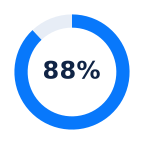
880completedof 1,000 cases
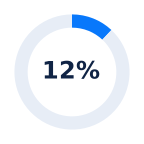
120openof 1,000 cases
Explore service, finance, warranty and stock screens. Browse the read-only preview using fictional service records.
Record the work once, then review it from the operational and commercial perspectives that matter.
Track corrective service, preventive visits, installations and inspections against the equipment history and expected closure.
Review response, downtime, repair turnaround, delivery promises and recurring visits using the timestamps you enter.
Separate field work, travel, office time, sales support and installation. Compare internal expense with customer charges.
Keep labor and parts costs visible under standard warranty, extended coverage and service contracts, even when the covered customer charge is zero.
Receive, reserve, issue, return and transfer parts. Review available stock, reorder prompts, expiry and moving-average valuation.
Try stock management ↗Capture the complaint, work, suspected cause, verification and recommendations, alongside the timing, coverage and cost details.
View a technical report ↗Anyone can browse the fictional public demonstration. Organizations can request full-version access without a software licence fee within an approved scope. Mohammed Badawy reviews requests; approval and acceptance of the terms are required before access.
Browse the dashboard and sample reports. Public operational actions remain disabled.
Explore the public demo →Sign in, request approval and accept the approved-use terms. Real-data deployment still needs IT, security, workflow and calculation acceptance.
Request free full-version access →Suggest improvements or request contributor permission. Source access and official releases remain controlled by Mohammed Badawy. Authorized development must retain Beyond the Service by MB branding and identify modifications.
Propose a contribution →This is not an open-source release. Redistribution, resale and rebranding require written permission. Hosting, setup, integrations, training and support are separately agreed; free access does not include unlimited support.
Read the approved-use terms →Keep evaluation, local operation and hosted services clearly defined.
Preview the workspace design using 1,000 fictional cases. Browse the actual interface with fixed fictional data; operational actions are disabled. Use this to explore the interface and inspect the sample calculations. Actions do not process real service requests.
Browse the application →Run the supplied package on your own computer or private server. A local installation can work offline after setup; shared access uses your network.
Organization IT acceptance, backups and security hardening are required before confidential use.
Commercial hosting and native iOS source are being prepared. The Apple app still needs compilation, signing, device testing and App Review.
No paid multi-customer cloud service or App Store release is available yet.
Twenty generic equipment types, forty assets and twenty-five scenario families cover warranty variants, delayed service, installations, parts waiting and incomplete records.
The public demonstration is for fictional data. Confidential operational use needs an approved private/local deployment, access controls, recovery procedures, security testing and the organization's IT acceptance.
No. Staging/export support is available. Live synchronization requires the customer's systems, API access, authentication, field mapping and acceptance testing.
Recorded delays can guide dispatch and stock reviews. Repeated symptoms can prompt investigation. Direct costs and coverage can support pricing and renewal discussions. The quality of those decisions depends on the completeness and accuracy of the underlying records.
Try the dashboard, inspect the reports and test the cases. The next step is an approved organization pilot with agreed users, deployment, support and success criteria. Software access is free within the approved scope; implementation and support are agreed separately. No paid checkout is active here.
Route service requests by account, area and available engineer capacity. A recorded Down status checks complete compatible loan kits. Active warranty creates a zero-charge backup request; chargeable service prepares an itemized loan offer for acceptance and Operations release.
Shared customer tickets and enforced staff roles require your organization-server deployment. The public preview uses fixed fictional records; operational actions are disabled. Loan offers are drafts; physical release, delivery and invoicing are separate.
Request a guided demonstration or discuss an evaluation pilot. Operational deployment is subject to agreed acceptance checks.
Prefer email? badawymohammed78@gmail.com
Please do not include patient information, confidential hospital records or passwords. Inquiry contact details are stored online so we can respond.